OpenClaw Quantization Research

QuantClaw: Precision Where It Matters for OpenClaw

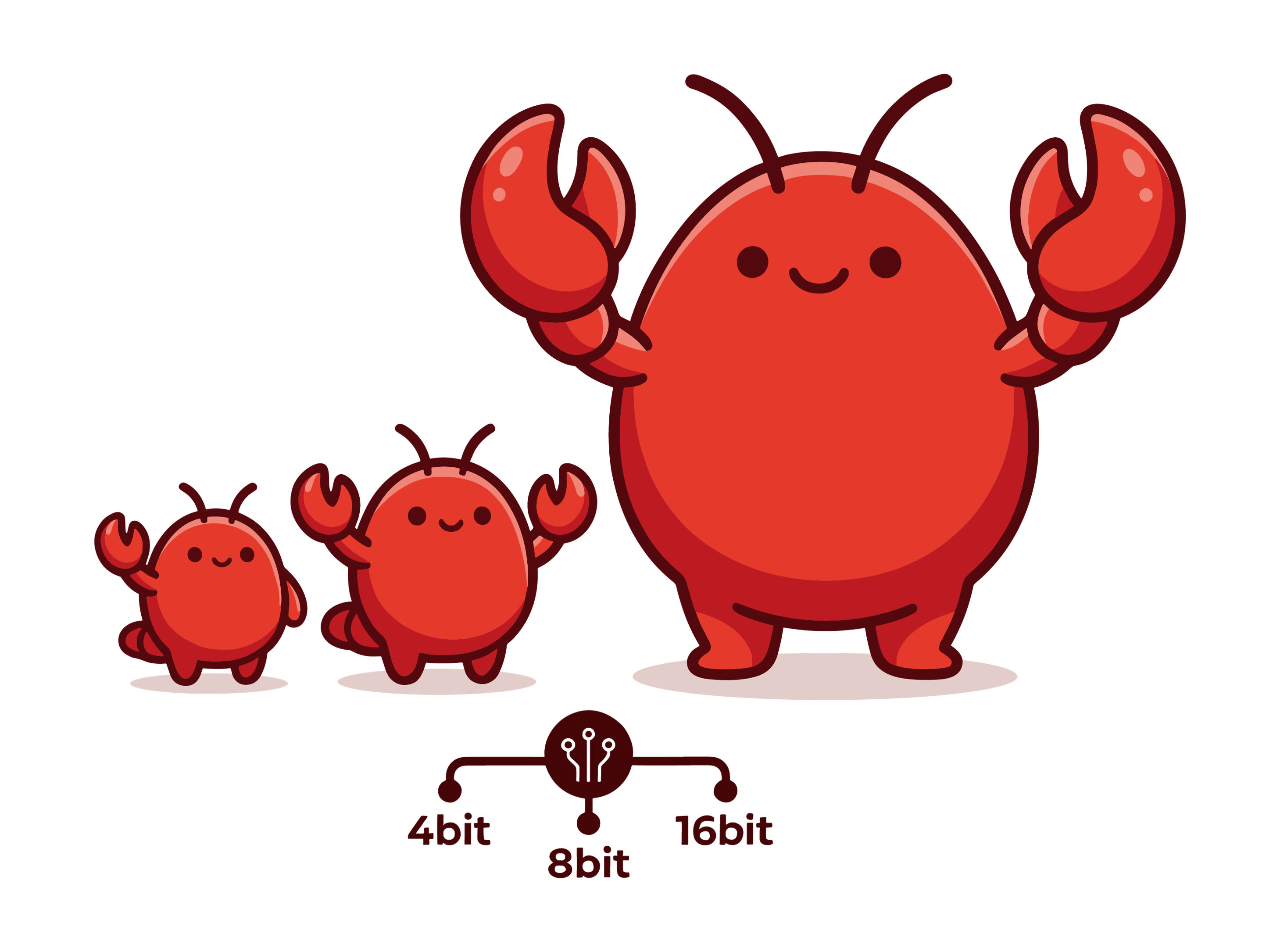
Not every query needs a supercomputer. We benchmarked model quantization across OpenClaw's full task spectrum and developed a router plugin that sends each query exactly where it belongs. Cut costs by ~20%, speed up ~10% without sacrificing capabilities.

24
Task Types
9B-744B
Model Scale
20%
Cost Cut
10%
Speed Up
QuantClaw overview

Why Quantization Matters for OpenClaw

OpenClaw has become one of the hottest open-source AI assistant projects of 2026. By combining large language models with browser control, Shell execution, memory, and automation tools, it transforms an AI assistant from a chatbot into an agent that can complete real workflows on the user’s behalf.

However, this capability comes at a steep token cost. Even a seemingly simple query can trigger far more than a single response, as OpenClaw often has to carry long system prompts, conversation history, tool outputs, and multi-step reasoning into each API call. In practice, users are paying not only for the answer itself, but for the overhead of running a full agent system.

Model quantization can make models cheaper and faster to run. By reducing numerical precision from 32-bit floats down to 4-bit or even 2-bit, quantization can dramatically shrink memory footprint and compute. However, its effect on agentic tasks remains unclear, motivating the following questions:

Research Questions

(1) How does quantization affect OpenClaw overall?

(2) How does its impact vary across different task types?

(3) How much cost can we actually save and how much speedup can we achieve in practice through quantization?
Quantization Impact on OpenClaw

To comprehensively understand how quantization affects OpenClaw's performance, we conducted an extensive study using Claw-Eval (release v0.0.0) which spans 24 distinct task types, 104 tasks, and 6 models at scales ranging from 9B to 744B. Each task was executed over 6 independent trials and evaluated via LLM judge and automated metrics across both BF16/FP8 (high-precision) and NVFP4 (quantized) configurations.

Model Summary
Models Parameters (B) BF16/FP8 Score NVFP4 Score
GLM-4.7-Flash300.63700.6034
GLM-57440.71300.7229
MiniMax-M2.52290.67600.6823
Qwen3.5-9B90.42670.4107
Qwen3.5-35B-A3B350.66860.6549
Qwen3.5-397B-A17B3970.70480.6937

Scaling Effect

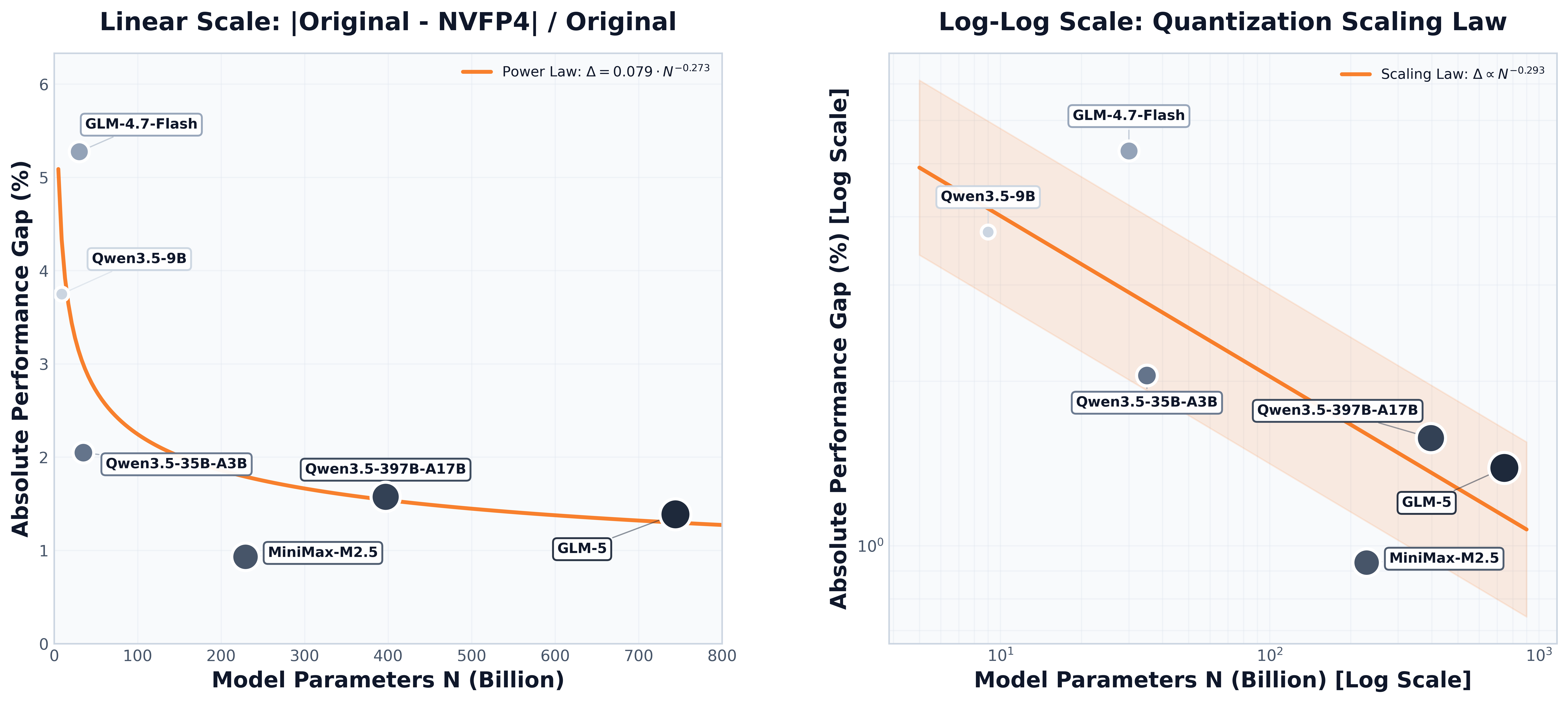
Quantization degradation exhibits a power-type scaling behavior with model size. Our sweep across 9B-744B models shows that smaller models (<30B) experience 3-5% performance degradation under NVFP4 quantization, whereas large models (200B+) degrade by less than 2%, and in some cases even achieve slight performance gains (+0.9% to +1.4%).

Scaling effect figure

Task Sensitivity Analysis: Quantization Varies by Task Types

Based on the experimental results, we divide different task types into three levels: 🔴 High Sensitivity, 🟢 Low Sensitivity and 🟡 Moderate Sensitivity.

Score Gain is computed as (BF16 - NVFP4) / BF16.

These tasks suffer significant performance degradation with quantization, requiring BF16/FP8 precision for reliable execution:

Task CategoryScore Gain
💻 Coding+12.27%
📋 Compliance+8.73%
🖥️ Terminal+6.69%
🛡️ Safety+6.50%
🧩 Synthesis+6.39%
🔄 Workflow+6.15%
📂 Organization+3.57%
⚙️ Operations+2.67%
🔐 Security+2.42%
Key Insight: Tasks involving Code generation, Safety-critical decisions and Complex operational workflows exhibit high quantization sensitivity. These domains share a common trait: they require precise boundary discrimination where small perturbations in model outputs can trigger qualitatively wrong actions, such as incorrect tool calls, policy violations, or safety failures. It suggests that these tasks may require BF16/FP8 precision to maintain reliability and accuracy.

These tasks maintain or improve performance with NVFP4 quantization across model scales:

Task CategoryScore Gain
🔬 Research-2.64%
🖼️ Multimodal-2.71%
📖 Comprehension-4.02%
📚 Knowledge-6.29%
📝 Office QA-6.84%
📊 Data Analysis-10.06%
Key Insight: Knowledge retrieval, analytical, and QA tasks tend to tolerate quantization. The consistent performance gains across comprehension, research, and analytical tasks suggest that NVFP4 may function as an implicit regularizer to encourage generalizable representations.

These tasks exhibit variable quantization tolerance:

Task CategoryScore Gain
✍️ Rewriting+1.37%
📁 File_ops+1.34%
💰 Finance+1.17%
📰 Content+0.83%
🛒 Procurement+0.73%
✅ Productivity+0.63%
🛠️ Ops+0.50%
🧠 Memory0.00%
✉️ Communication-0.48%
Key Insight: Memory, Simple operations and Communication tasks show moderate sensitivity to quantization. These tasks can flexibly use either precision format depending on cost-speed performance requirements.

Score, Speed and Cost

Based on the task sensitivity analysis and observed tradeoffs between score, speed, and cost, we derive a deployment guideline for choosing between BF16/FP8 and NVFP4 quantization along three optimization targets:

  1. Score vs. Speed (Faster): Minimize inference latency without quality degradation - prioritize tasks where latency reduction outweighs marginal score changes
  2. Score vs. Cost (Cheaper): Minimize inference spend at parity - target tasks where quality holds steady or improves as cost drops
  3. Score vs. Cost vs. Speed: Optimize all three simultaneously - identify tasks where faster, cheaper inference also yields better outputs

Routing Views

Click the tabs to switch views.

Speed Δ = (BF16 Speed - NVFP4 Speed) / (BF16 Speed). Cost Δ = (BF16 Cost - NVFP4 Cost) / (BF16 Cost).

🏆 Score vs Speed
RankTask CategoryPreferred PrecisionSpeed Δ (BF16-NVFP4)Score Gain
1💻 Coding16/8-bit+13.58%+12.27%
2📋 Compliance16/8-bit+7.32%+8.73%
3🖥️ Terminal16/8-bit+16.66%+6.69%
4🛡️ Safety16/8-bit-9.12%+6.50%
5🧩 Synthesis16/8-bit-4.88%+6.39%
6🔄 Workflow16/8-bit-13.64%+6.15%
7📂 Organization16/8-bit+1.42%+3.57%
8⚙️ Operations16/8-bit-3.07%+2.67%
9🔐 Security16/8-bit-17.38%+2.42%
10✍️ Rewriting16/8-bit+0.32%+1.37%
11📁 File_ops16/8-bit+9.96%+1.34%
12💰 Finance16/8-bit+6.79%+1.17%
13📰 Content16/8-bit-5.08%+0.83%
14🛒 Procurement16/8-bit-12.13%+0.73%
15✅ Productivity16/8-bit+2.62%+0.63%
16🛠️ Ops16/8-bit-1.26%+0.50%
17🧠 Memory16/8-bit+33.86%0.00%
18✉️ Communication4-bit-14.30%-0.48%
19🔬 Research4-bit-26.09%-2.64%
20🖼️ Multimodal4-bit+46.88%-2.71%
21📖 Comprehension4-bit+7.69%-4.02%
22📚 Knowledge4-bit-0.01%-6.29%
23📝 Office QA4-bit-4.41%-6.84%
24📊 Data Analysis4-bit+0.75%-10.06%
Recommendation: For speed-critical applications, NVFP4 is preferred for the bottom 7 tasks, delivering faster inference or maintained/improved quality. Reserve BF16/FP8 for the top 17 precision-critical tasks where speed degradation is acceptable to preserve accuracy.
💰 Score vs Cost
RankTask CategoryPreferred PrecisionCost Δ (BF16-NVFP4)Score Gain
1💻 Coding16/8-bit-30.58%+12.27%
2📋 Compliance16/8-bit-0.68%+8.73%
3🖥️ Terminal16/8-bit+30.56%+6.69%
4🛡️ Safety16/8-bit+17.94%+6.50%
5🧩 Synthesis16/8-bit+11.82%+6.39%
6🔄 Workflow16/8-bit+7.55%+6.15%
7📂 Organization16/8-bit+24.82%+3.57%
8⚙️ Operations16/8-bit+17.83%+2.67%
9🔐 Security16/8-bit+5.79%+2.42%
10✍️ Rewriting16/8-bit+24.97%+1.37%
11📁 File_ops16/8-bit+20.66%+1.34%
12💰 Finance16/8-bit+13.89%+1.17%
13🛒 Procurement16/8-bit-2.46%+0.73%
14📰 Content4-bit+19.22%+0.83%
15✅ Productivity4-bit+25.40%+0.63%
16🛠️ Ops4-bit+13.23%+0.50%
17🧠 Memory4-bit+15.70%0.00%
18✉️ Communication4-bit+19.22%-0.48%
19🔬 Research4-bit+3.87%-2.64%
20🖼️ Multimodal4-bit-1.92%-2.71%
21📖 Comprehension4-bit-0.56%-2.71%
22📚 Knowledge4-bit+15.29%-6.29%
23📝 Office QA4-bit+25.77%-6.84%
24📊 Data Analysis4-bit+13.59%-10.06%
Recommendation: For cost-critical applications, NVFP4 is preferred for the bottom 11 tasks, delivering positive or neutral score gain impact (-10.06% to +0.83%) with significant cost savings. Reserve BF16/FP8 for the top 13 tasks where quantization severely degrades score performance, particularly Coding, Safety, and Compliance where score loss exceeds 5% and justifies the precision premium.

⚖️ Score vs Speed vs Cost

X: Speed Δ · Y (vertical): SCORE_GAIN · Z: Cost Δ
3D chart loads only when this section is visible to keep GitHub-hosted pages responsive.
Drag to rotate  ·  Scroll to zoom  ·  Hover for details  ·  Auto-rotates after 3s idle

Introducing QuantClaw

Overview
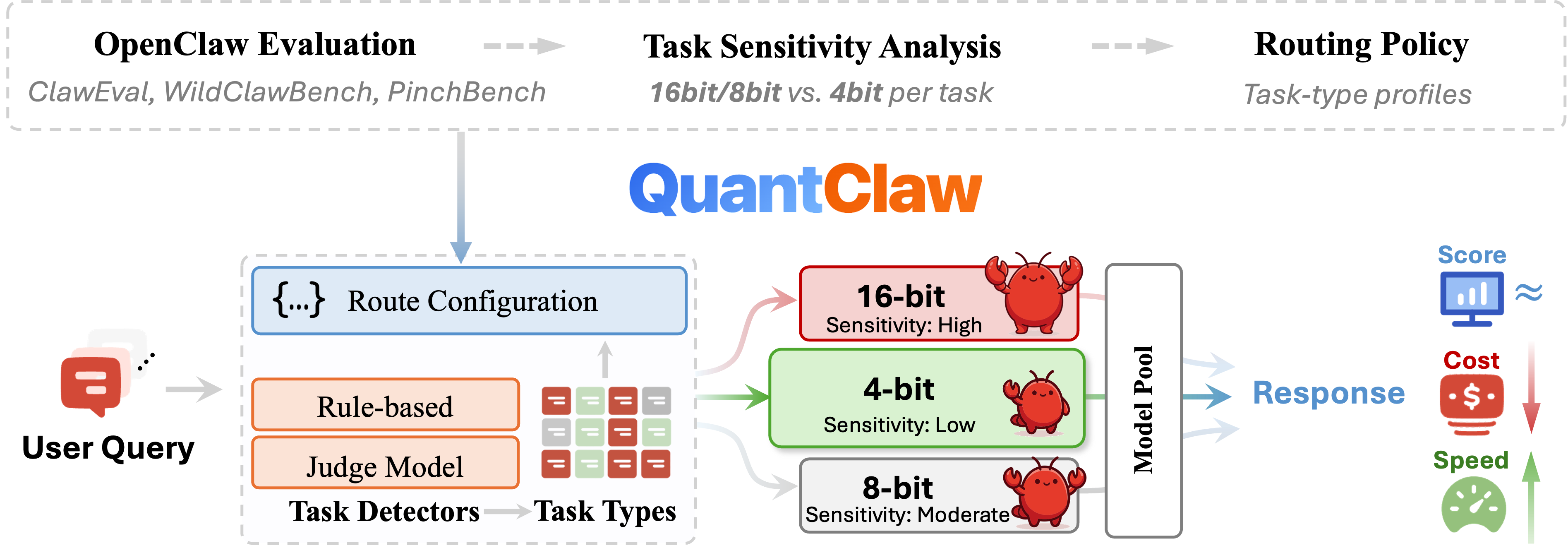
QuantClaw overview

QuantClaw is a plug-and-play task-type routing quantization plugin designed for OpenClaw. It enables model precision switching based on task type for user-submitted queries, striking an effective balance between quality, efficiency, and cost. QuantClaw features automatic adaptation, intelligent routing, full customizability, and built-in observability.

Automatic Adaptation

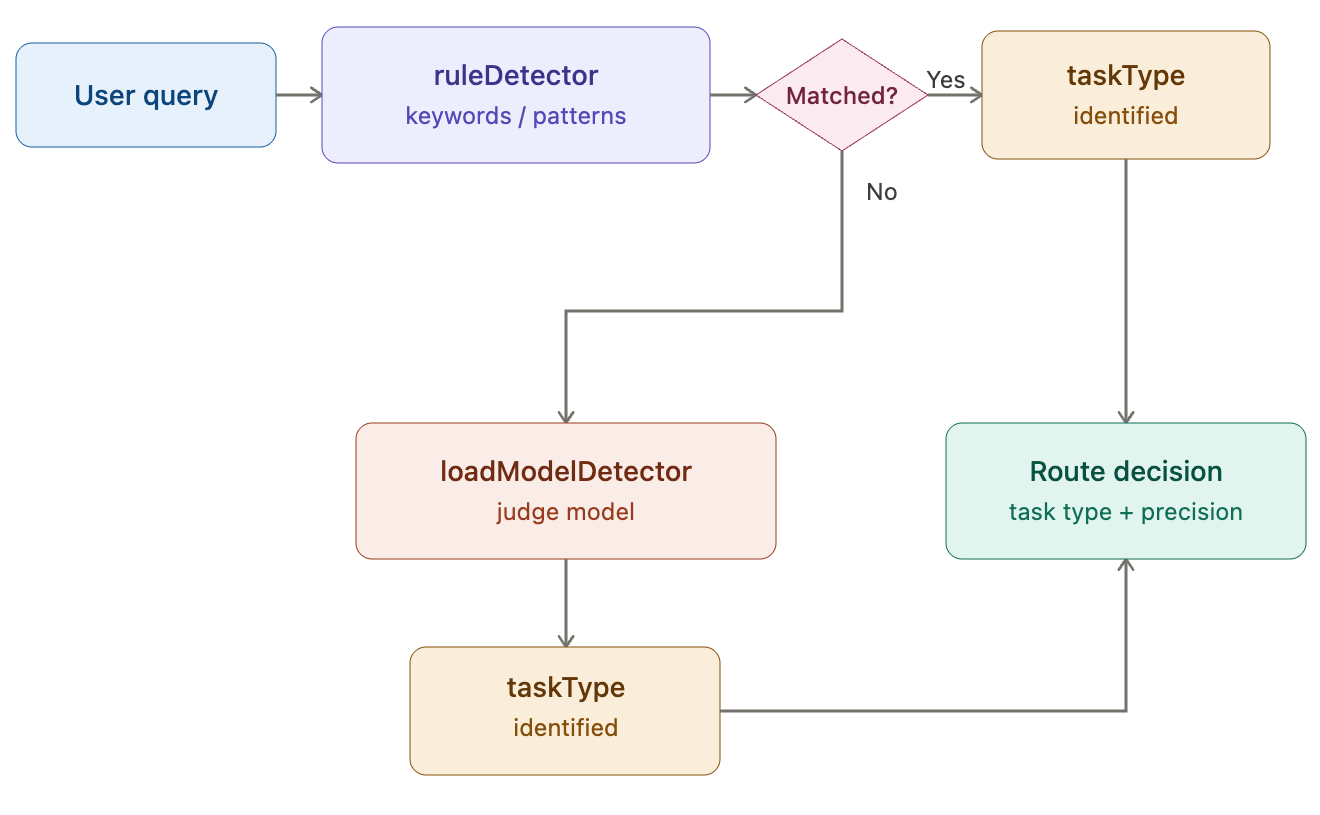
Given a user query, QuantClaw automatically determines the most suitable routing path without requiring the user to manually choose precision. It currently supports ordered detectors, including ruleDetector and loadModelDetector. In a typical workflow, ruleDetector first attempts to classify the query using predefined keywords, patterns, and task-type descriptions. If no reliable match is found, loadModelDetector invokes a judge model to identify the most appropriate task type. This allows QuantClaw to adapt dynamically to both explicit and ambiguous user intents.

ruleDetector workflow diagram

Intelligent Routing

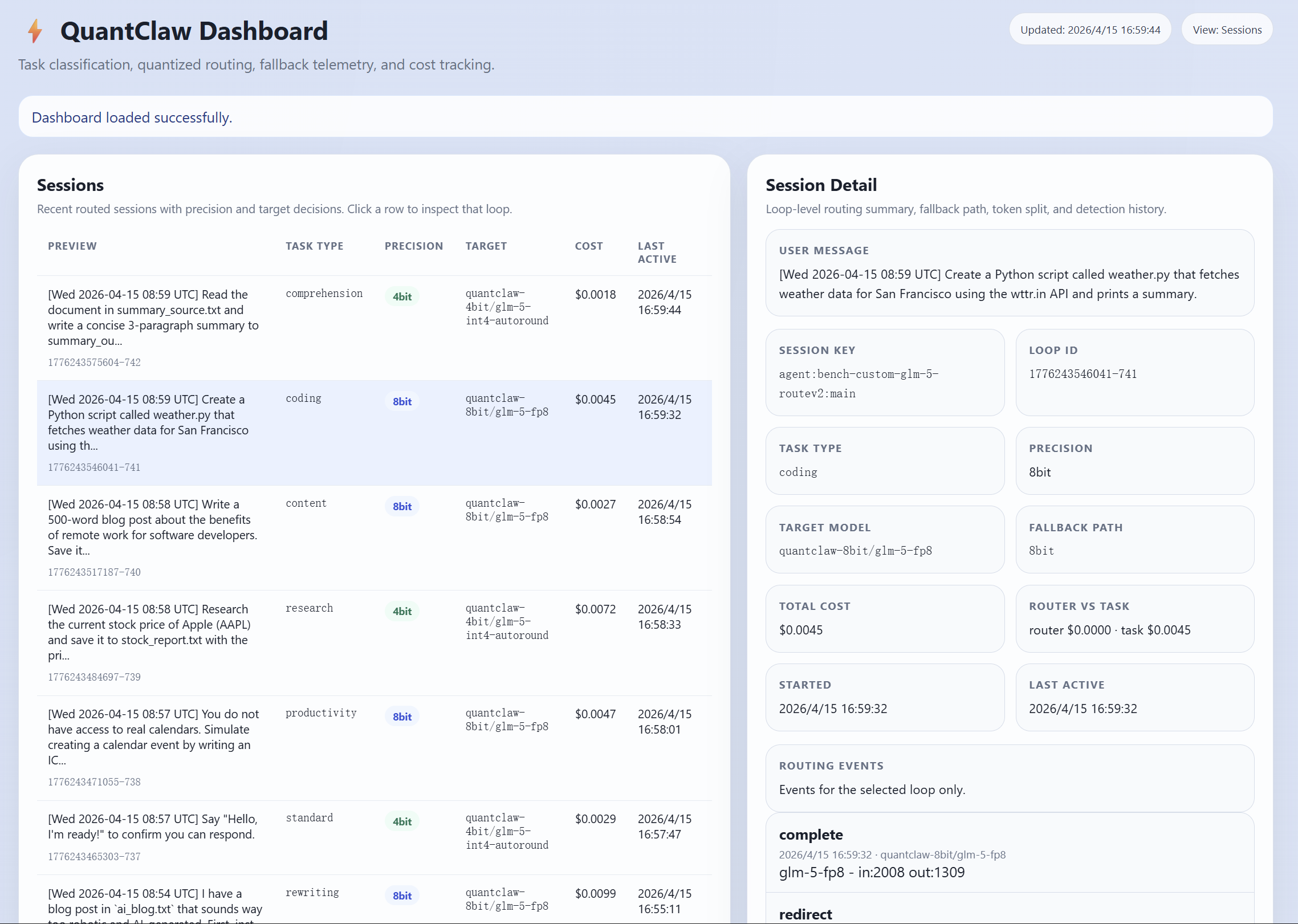
Based on previous Tasks Sensitivity Analysis, QuantClaw maps each request to a predefined precision tier such as 4-bit, 8-bit, or 16-bit, and routes it to the corresponding bit-level model. This allows quantization-tolerant tasks to run on faster, more economical models, while reserving precision-critical tasks for higher-precision variants. By decoupling task understanding from model selection, QuantClaw makes routing decisions explainable, latency-aware, and cost-conscious.

QuantClaw intelligent routing session view

Full Customizability

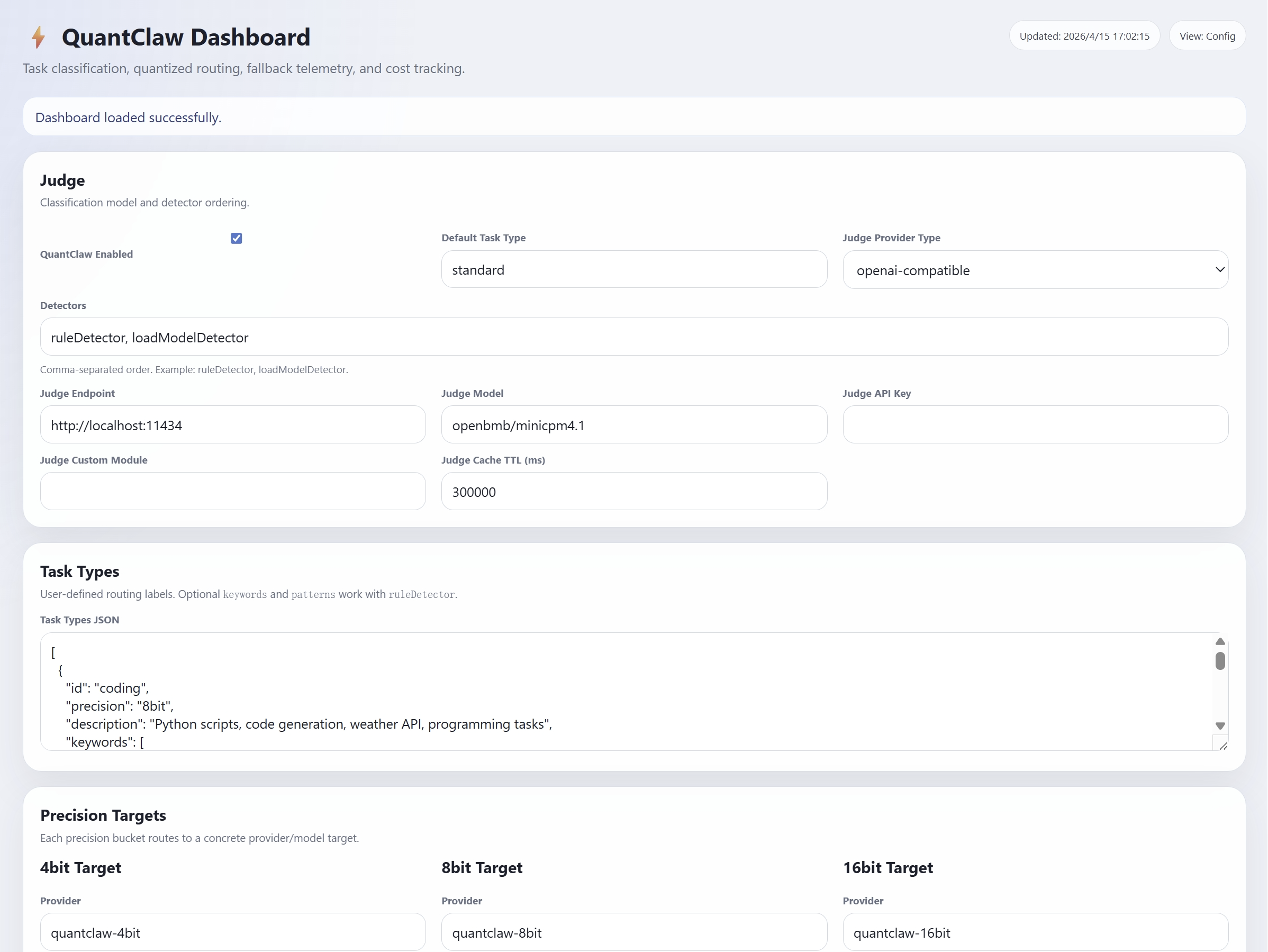
QuantClaw is designed to be fully configurable. Developers can define task types, detector order, keywords, regex patterns, precision mappings, model targets, fallback paths, and pricing policies according to their own workload requirements. This makes QuantClaw suitable for a wide range of deployment strategies, from low-cost everyday assistants to more advanced multi-model systems that require precise control over speed, quality, and budget.

QuantClaw configuration view

Built-in Dashboard and Observability

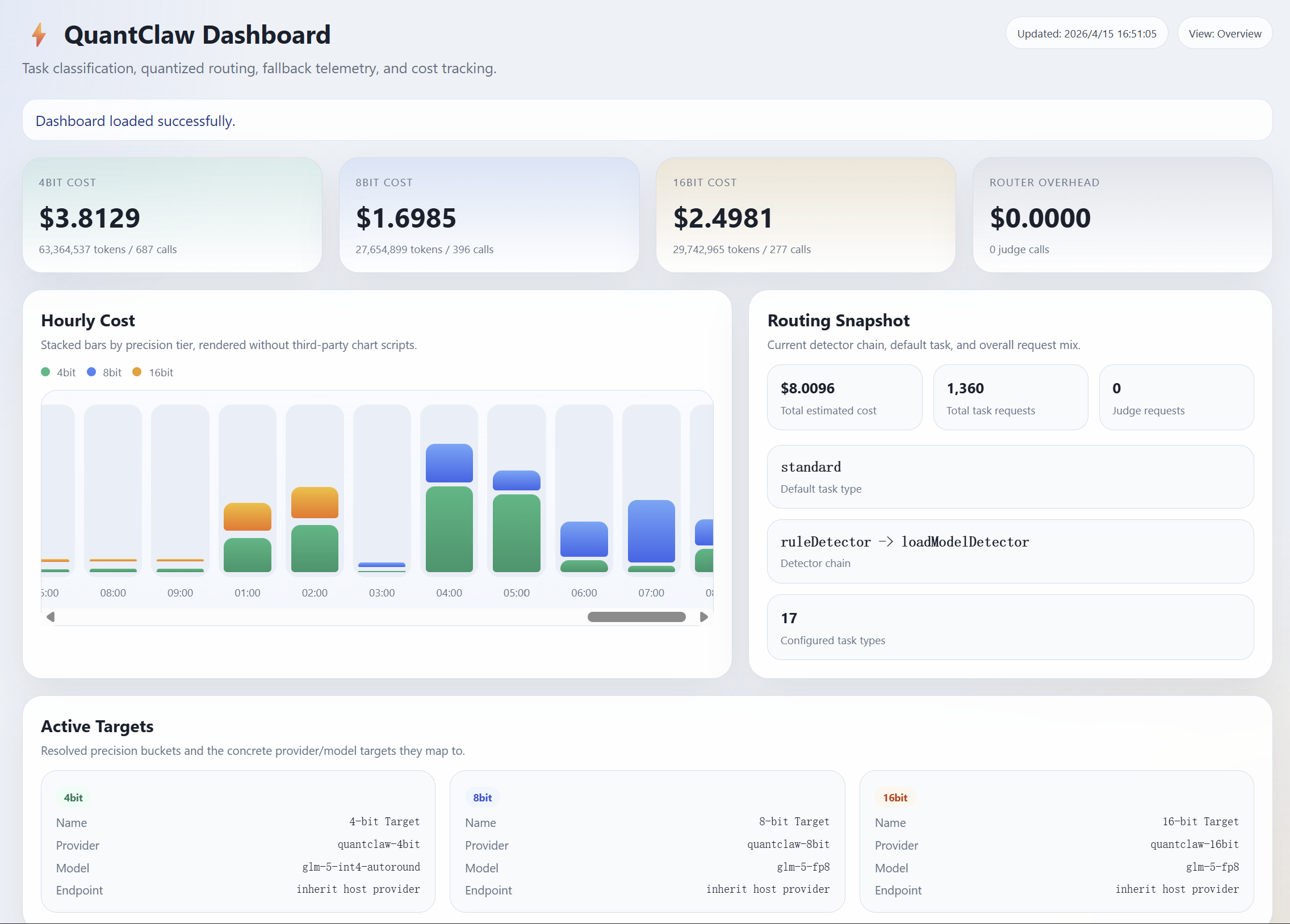
QuantClaw includes a built-in dashboard for monitoring routing behavior, token usage, cost, and detection results in real time. It also supports live configuration and testing, making QuantClaw an observable and tunable routing layer within OpenClaw.

QuantClaw dashboard

Benefits from QuantClaw

Since task sensitivity analysis is conducted on Claw-Eval using NVFP4 quantization, we also performed experiments on the PinchBench benchmark and INT4 data format to verify the generalizability of our findings. QuantClaw achieves up to 1.09× speedup and 21.7% cost savings on GLM-4.7-Flash, and 1.04× speedup and 6.3% cost savings on GLM-5, compared to the FP8/BF16 baselines, while maintaining or improving accuracy.

ModelApproachPinchBench (Best / Avg)Cost(usd) per taskTime(s) per task
GLM-4.7-FlashAll BF1681.57 / 81.260.00159819.07
All INT482.63 / 78.710.00142221.80
QuantClaw84.11 / 85.460.00125217.47
GLM-5All FP887.65 / 87.080.012734.53
All INT490.10 / 88.240.010532.19
QuantClaw90.09 / 89.090.011933.21

More results will be updated soon

The Bigger Picture

The future of personal AI assistants are not a single model running at maximum capacity all the time. It is a coordinated OpenClaw system where models of different strengths are dispatched intelligently according to the work that actually needs to be done.

QuantClaw shows what OpenClaw can become when orchestration is treated as a first-class capability rather than an afterthought. The value of OpenClaw is not just that it can connect to many models, but that it can decide how those models should be used together. Most user requests do not need maximum capability, maximum cost, and maximum latency all at once. What they need is the right level of capability for the task. QuantClaw gives OpenClaw that decision layer: routing lightweight tasks to cheaper precision tiers, preserving stronger models for more demanding work, and making the entire system more efficient without increasing user complexity. In that sense, QuantClaw is not just a plugin for OpenClaw; it is a concrete example of how OpenClaw becomes a real multi-model collaborative system.